


Before you launch, finish what would block a first user, and let the rest ship rough. Early-stage founders stuck polishing details a first user would never notice, or about to ship with something that breaks trust, should walk the product the way a stranger would and write a short punch list.
Say a founder spent three weeks polishing the welcome animations on a project tool. The motion looked finished. In the same stretch, the signup confirmation emails were landing in spam, so trial users never got their login link. The product looked ready and could not be used. The other miss shows up just as often: launching on a Thursday with a password reset that returns an error, then spending the weekend answering the same frustrated message.
The name comes from construction. Before handover, the builder walks the job and lists the items that still have to be finished. The walkthrough is thorough. The list stays short and specific, so the keys can change hands.
1. Walk It Like a Stranger
Do the first-user walkthrough yourself, on a fresh account, on a phone or laptop you do not usually use for demos. Start at the signup screen. Write down every snag, including the ones you have trained yourself to skip.

Walk the space like a stranger and mark every snag before you sort the list.
In the hypothetical, that walk would have caught the confirmation email that never arrived, long before the animations were worth another week of work. It also would have caught a broken password reset, because a stranger who cannot get back in is stuck. Write each snag in plain language: "Signup email never arrived in the inbox or the spam folder." Keep going until you have tried to complete the job a first user came to do.
2. Run the Blocks a User or Bugs Only You? Test
Every item on the walk gets sorted into one of three buckets.
Blocks a user: they cannot finish the job. The missing confirmation email belongs here. So does a password reset that returns an error. These have to be fixed before you launch.
Embarrasses you but not them: the work is a little rough, and the user can still get through. A stiff welcome animation belongs here. Ship it rough, and put it on a list.
Nobody will notice: if you had not gone looking, the item would not have come up. An unused theme toggle on the settings page belongs here. Cut it from the launch list.
That is the Blocks a User or Bugs Only You? test. Sort every snag before you spend another week on any of them.
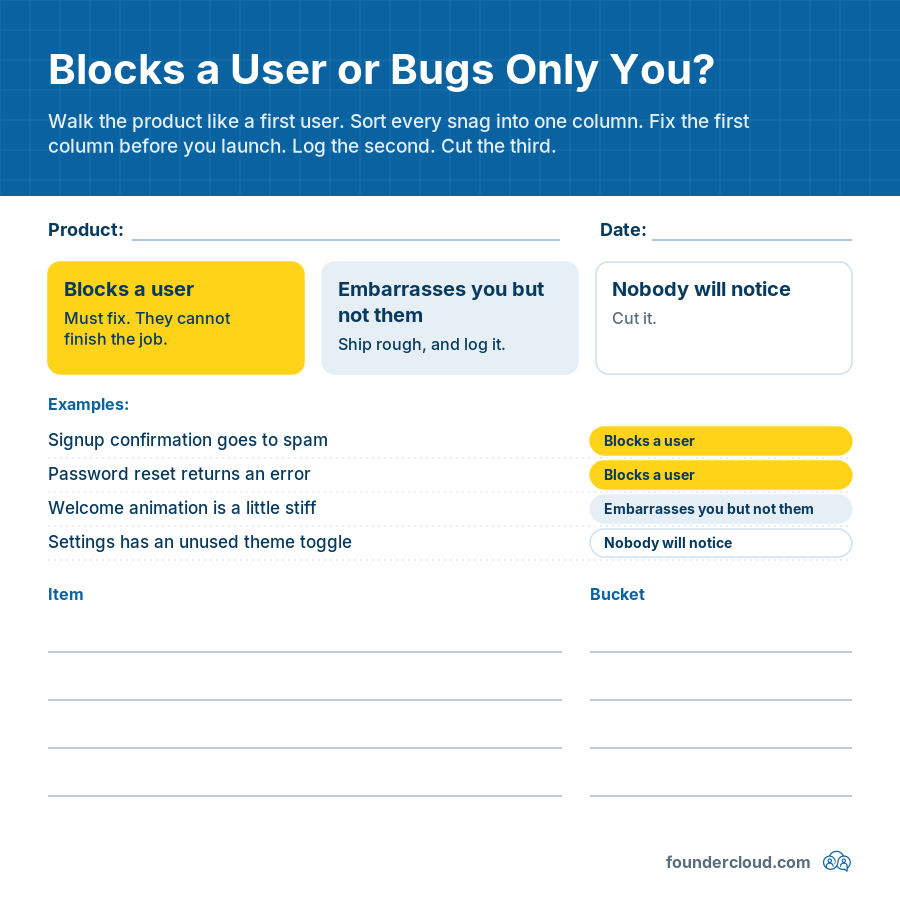
Walk the product like a first user, then sort every snag: blocks a user, embarrasses you but not them, or nobody will notice.
3. Fix the Blockers, and Log the Rest in Public
Fix the first bucket until a stranger can finish the job. In the project-tool example, that means the confirmation email arrives, and the password reset works, before anyone spends more time on motion.
The second bucket can ship rough if you log it where users can see it. A short known-issues note is enough: "The welcome animation is still a little stiff. We know, and it is on the list for next week." Put that note where a first user will see it, such as a short line inside the product, so a rough edge has a place to live.
The third bucket comes off the list. You can keep a private note if you still care about the theme toggle. It does not belong on the launch punch list.
4. Ship, Then Walk It Again Next Week
Once the blockers are fixed and the rest is logged or cut, ship. Then put a second walk on the calendar for the following week, again on a fresh account. Set the date for that walk before you launch, so it does not depend on how the week feels. New snags show up once real people are in the product, and a punch list that never gets a second walk goes stale.
In the hypothetical, the week-two walk might find that the confirmation email now arrives, while the invite link for a second teammate lands in spam. That item goes through the same test. If it blocks a user, it goes to the top of the next list.
If you want a second set of eyes on what belongs in which bucket, share the punch list in the FounderCloud community.
This week, walk your product like a first user, write down every snag, and run the Blocks a User or Bugs Only You? test. Fix the blockers, log the rest, and ship.
Pocket checklist:
- Walk the product on a fresh account, and write down every snag.
- Sort each item: blocks a user, embarrasses you but not them, or nobody will notice.
- Fix the blockers before launch.
- Put the rough-but-usable items on a short public known-issues list, and cut the rest.
- Ship, then walk it again next week and run the same test.
Do the walk before you spend another week on polish.
19th November 2026